Thursday, March 28, 2019

Xprog 5.7.4 Xprog 5.5.5 Download Free: No Need Dongle

Free download xprog box 5.7.4 xprog m 5.5.5 software:
download link: https://mega.nz/#F!I8ZkDB4B!C2SuJxYODFbCNTMDXNxDPg
content:
xprog-v555-v574

xprog 5.5.5:
xprog-v555

xprog 5.74:
xprog-v574

note:
I broke my Xprog when i try to update to 5.7.4.
I must replace yje atmel chip. I bought new, then program it with TL866 programmer
All instructions you find in txt file
For me, 5.7.4 software didn't work, but 5.5.5 works very good
Dongle for 5.5.5 not needed


installation instruction:

Unzip the XProg 5.7.4.zip contents to a folder on your desktop.
Open the folder AVRDUDESS and run avrdudess.exe program.

The following procedure will flash the version 5.5.5 firmware on your Xprog device.
Select your programmer.
Click on "Detect" at the top right corner. It will detect a ATMEGA64.
Select your flash file which is in the Firmware folder.
Select your EEPROM file which is in the Firmware folder.
Enable the "Erase flash and EEPROM (-e)" option.
Set the following in the "Fuses & lock bits"

L : 0x2F
H : 0xCA
E : 0xFF
LB : 0x3C

and enable the "Set fuses" and "Set lock" options.

Finally click on "Program!" and wait till it finishes and verify all the data are flashed correctly.
If not then try again.

Now that the Xprog has the 5.5.5 version firmware,
go to the "XprogDesktop" folder and run "XprogDesktop.exe" file.
Click on "Help->Hardware info..." and once it opens it will ask to upgrage the firmware.
If not, then click on the "Upgrade" button. Once this procedure is finished
you can try and read a processor. It will ask for a certificate. If it fails try again.
When it is finished the Xprog will run the latest firmware and you will be able to work
with the latest 5.7.4 software.

This is not a completely tested solution and you try the above steps with your own responsibility.
I bring no responsibility if you brick your own Xprog programmer.

Very important:
If you want xprog software confirmed to work, you can get a decent crack version.
A lot of xprog download links can be found here:
http://blog.obdii365.com/2017/04/23/xprog-5-74-5-70-5-60-5-55-5-51-download/
(Newest) Xprog 5.8.4 confirmed to work perfectly:
http://www.obdii365.com/wholesale/xprog-m-programmer-dongle-cas-decryption.html

Xprog 5.7.4 software 100% working:
http://www.obdii365.com/wholesale/v570-xprog-m-ecu-programmer.html
Xprog 5.5.5 software 100% working:
http://www.obdii365.com/wholesale/xprog-m-programmer-dongle-cas-decryption.html


Tuesday, March 12, 2019

Read Audi ELV 908GR16 with Xprog or VVDI Prog

ELV AUDI MC68H908GR16 mcu read by Xprog or VVDI Prog, which is faster?

1)Read 908GR16 with Xprog
Require xprog version newer than 5.70 (Xprog v5.70, 5.74, 5.84)
Connect ELV 908GR16 mcu with Xprog via HC(S)12 BDM adapter
xprog-read-audi-elv-908gr16-1

xprog-read-audi-elv-908gr16-2
In Xprog-m software, select Freescale MCU MC68H908GR16_FLASH+ security
xprog-read-audi-elv-908gr16-3
select Read Security Bytes
xprog-read-audi-elv-908gr16-4
Bypass security
xprog-read-audi-elv-908gr16-5

Xprog m read security byte success, press OK to continue
Go to Options tab->Environment->Device->Manual
xprog-read-audi-elv-908gr16-6

xprog-read-audi-elv-908gr16-7
Manully enter security bytes
xprog-read-audi-elv-908gr16-8
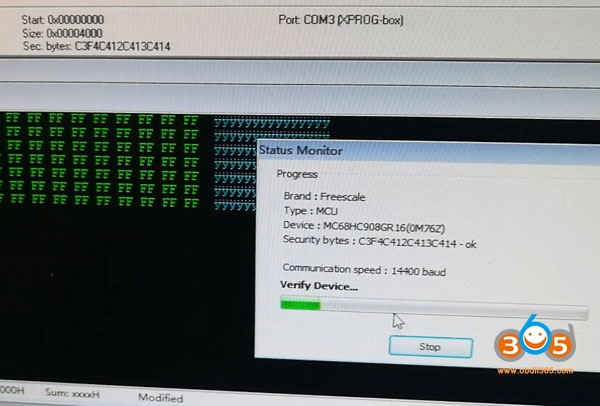
Read 908GR16 in process
xprog-read-audi-elv-908gr16-9
Verify device
xprog-read-audi-elv-908gr16-10
Read data success
xprog-read-audi-elv-908gr16-11
Save data.
Reading procedure takes 1 minute and 59 seconds


2) Read 908GR16 with Xhorse VVDI Prog
vvdiprog-read-audi-elv-908gr16-1

vvdiprog-read-audi-elv-908gr16-2
Follow wiring diagram to connect VVDI prog with ESL
vvdiprog-read-audi-elv-908gr16-3

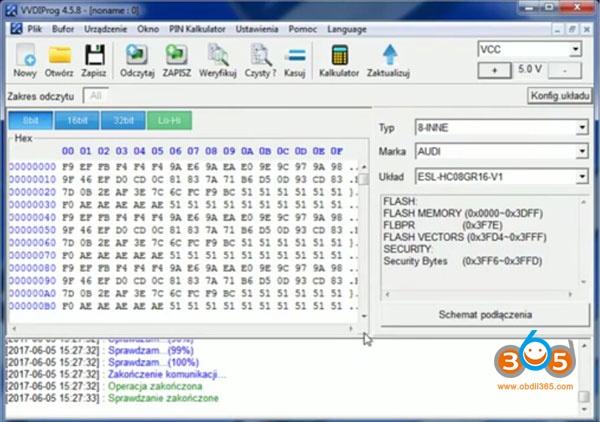
In VVDIProg software, select Audi ESL HC08GR16 V1
vvdiprog-read-audi-elv-908gr16-4
vvdiprog-read-audi-elv-908gr16-5

Read data
vvdiprog-read-audi-elv-908gr16-6

Verify data
vvdiprog-read-audi-elv-908gr16-7

Save data
Reading process takes 2 minutes.


In conclusion:
Xprog is cheaper and faster than VVDIProg in Audi ELV 908GR16 reading.

http://blog.obdii365.com/2019/03/12/read-audi-elv-esl-hc908gr16-with-xprog-or-vvdi-prog/

Friday, March 8, 2019

How to Reset AEC302C AEC400 CDI controllers with Xprog

Manufacturer of AEC302C / AEC400 CDI controllers didn’t left possibility to access internal MCU memory by K-Line. Therefore it is really possible to reset them if you have any MOTOROLA MC68HC05E6 programmer (XPROG / XPROGm, UPA, CARPROG, ELNEC, etc.).

Opening the plastic casing
xprog-reset-AEC302C-cdi-1

xprog-reset-AEC302C-cdi-2
Make a cut around plastic casing to gain access to the printed circuit board (PCB). Don’t cut too deep – you can damage electrolytic capacitors near the edges of plastic casing! Clean the PCB from epoxy sealant. It is significantly easier to clean if sealant is heated using hot air station or other source of hot air (fan, etc.) – it becomes crumbly and comes out without excessive effort.


How to connect MCU programmer
xprog-reset-AEC302C-cdi-3

NOTE. Wire colors in the picture, corresponds to CARPROG cable A10. Signal symbols B2, B3, B5, B6, Vcc, Vpp – to XPROG / XPROG-m programmer.


MCU settings for programmer

MCU type: MC68HC05E6
Mask set: 0F82B
EEPROM start: 0x0100 (hex)
EEPROM size: 0xA0 (160 bytes)
Osc. Frequency: 4 MHz


How to reset CDI controller to NEW
xprog-reset-AEC302C-cdi-4
Change data at marked position from 00 to 01. This way you will change CDI controller state to NEVER PROGRAMMED. CDI controller is ready now to store new code on the first time ignition is switched to ON with a master key.

NOTE. Ignition must be switched on with valid MASTER key that belongs to immobilizer controller IMM003 / IMM006.

Monday, January 7, 2019

2001 Benz W215 EIS read by VVDI Prog or Xprog?

Discussion: what is the best programmer for cl600-2001 w215 eis read?

Car: cl600-2001 w215
Eis:
benz-w215-eis-1

benz-w215-eis-2
Xhorse Vvdi prog and Xprog: which can read cl600-2001 w215 eis?
vvdi-prog-read-benz-w215-eis-discussion
Jevgenijs Kuhalskis: This Motorola is with security, vvdi can’t read
Borislav Radusin: vvdi prog read this!!!
Jevgenijs Kuhalskis: Can if not security
Christian Montoya: Vvdi prog read 9s12 sec
Jevgenijs Kuhalskis: We talked about about Motorola 705!!!!!!!!!
Borislav Radusin: vvdi prog read this with mcu adapter…

This mcu:
have secured if u trying to read many times and get failed the mcu erased data u get dump fffffffff
vvdi-prog-read-benz-w215-eis-1

Buy ETL for HC08 its very good for secured mcu

Vvdi prog:
Vvdi prog is the best programmer…
no programmer can do everything but if you have vvdiprog, xprog Clone and upa ori you can do 99 percent of all and you pay only 650 bucks for all of them. In my country thats a good Deal
vvdi-prog-read-benz-w215-eis-2

vvdi-prog-read-benz-w215-eis-3
number for adapter: MC68HC05X32-ADAPTER-V1.0

Xprog:
Xprog programer can do it.
Xprog 5.7.0 and 5.5.1 tested!
Xprog 5.5.1 and this mcu
xprog-v551-read-benz-w215-eis-1

xprog-v551-read-benz-w215-eis-2

xprog-v551-read-benz-w215-eis-3

xprog-v551-read-benz-w215-eis-4

xprog-v551-read-benz-w215-eis-5

xprog-v551-read-benz-w215-eis-6
Xprog 5.7.0 and this mcu
xprog-v570-read-benz-w215-eis-1

xprog-v570-read-benz-w215-eis-2

xprog-v570-read-benz-w215-eis-3
Other programmers for Motorola:
Orange 5 it’s the best for your MCU (Ak500 reads well)
Vvdi prog is okay to read w215 – select correct mask
BUT.. Orange 5 is safer tool for the same process

Monday, December 17, 2018

How to Read Mini Cooper Dash MCU 0K50E with Xprog v5.55

Mini Cooper dash MCU mask 0K50E read with Xprog 5.55 clone programmer.
Tested with 2 PCB and work fine!!!

Read/write eeprom ok!
Read/write flash ok!


MCU Secured!!!
xprog-mini-cooper-mcu-0k50e-1
xprog-mini-cooper-mcu-0k50e-2

xprog-mini-cooper-mcu-0k50e-3
http://www.obdii365.com/wholesale/xprogm-v555-ecu-programmer.html