Showing posts with label orange 5. Show all posts

Thursday, January 13, 2022

Convert FRM3 D-flash to EEE and Repair by XPROG

 Q: Looking to do BMW FRM3 programming and looking at purchasing the Xhorse VVDI Prog. I am curious if I were to get a corrupted FRM3 read is there a cloud database Xhorse has that will have a good eeprom file to flash back into the corrupted FRM3? As long as its a compatible ID of course. I could not find any software to convert the D-flash to eeprom.


A: Yes, you can use this tool: http://tlvps.tomvanleeuwen.nl/frm/

The best way to repair FRM module seems to be reading dFlash memory. When you try to read it, the programmer tells you the partition is correct and then you choose the size of EEPROM of 0 sectors - then you read full dflash.   You can download the dflash to eee convertor, convert the data and write back as eee.

This tool allows the currupt data in the microprocessor to be read, even after the eeprom not corrupted. This is done by reading the d-flash contents from the microprocessor using an appropriate programmer (like xprog, vvdi prog, orange5, upa etc), after which this program can convert it to an eeprom image which can then be programmed to the simulated eeprom area again using the same programmer.
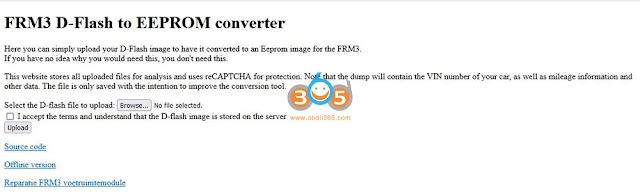
convert frm3 d-flash to eeprom

How to use the D-FLASH to EEPROM converter:

Example 1: 

Repairing BMW FRM3 with vvdi prog (incl. convert D-flash to EEPROM).


Example 2:

Repair FRM3 with xprog China clone

xprog-repair-bmw-frm3-1

1. Prep the solder points. They are large test points that take rosin-core solder quite readily - Nice and easy to solder.

xprog-repair-bmw-frm3-2


2. Solder the wires to the test points. Your colours may vary if you received a different wiring harness with your XProg.

xprog-repair-bmw-frm3-3

3. You don't need to use the daughterboard, but I figured it wouldn't hurt. Here are the labels from the HC(S)12 adapter board:

xprog-repair-bmw-frm3-4

4. Wire colours, if you have a matching harness:

xprog-repair-bmw-frm3-5

So the soldering is done, now its time for the programming.

5. Open XProg and select: "MCU/MPU" -> "Freescale 9S12XE" -> "MC9S12XEQ384_D-FLASH"
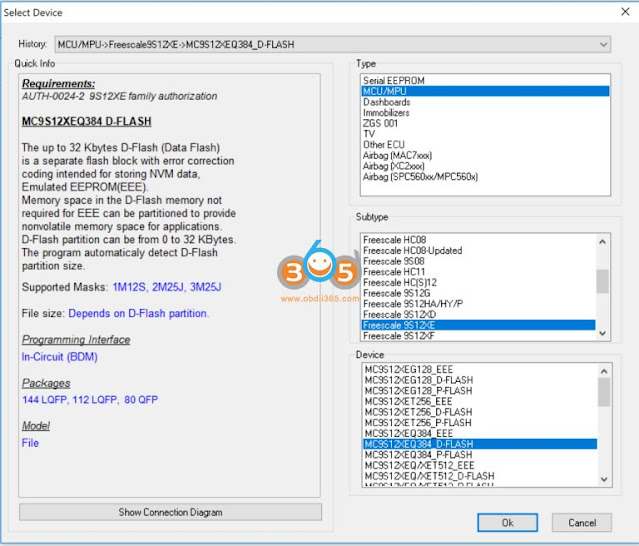
xprog-repair-bmw-frm3-6

6. Open a new hex file to download the D-FLASH.
a. Click "New"
b. Click "Read"
c. At this point XProg will connect, check certificates, then set up BDM. It will probably tell you the flash is corrupted, you need to select 0k of EEPROM and 32k of FLASH (This is the default).
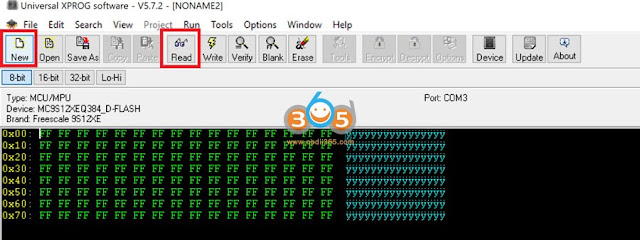
xprog-repair-bmw-frm3-7

7. Once the download is complete, save the D-FLASH. Open the D-FLASH using tomvleeuwen's app or webpage - http://tlvps.tomvanleeuwen.nl/frm/ . If you use the app it will ask you to open the D-FLASH you just saved, then ask you where you want to store the new EEPROM (I used the app, as my computer needed to be offline to use XProg)

8. Open the newly created EEPROM file in XProg

xprog-repair-bmw-frm3-8

9. Change the device to: "MCU/MPU" -> "Freescale 9S12XE" -> "MC9S12XEQ384_EEE"

xprog-repair-bmw-frm3-9

10. Write the new EEPROM to the FRM3
a. Click "Erase". Yes I am sure. Yes the flash is corrupted - Fix it.
b. Click "Write"
c. Click "Verify".
d. Run the "Erase" / "Write" / "Verify" three times to get it to verify correctly.
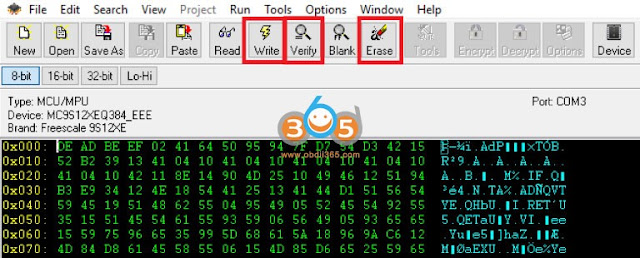
xprog-repair-bmw-frm3-10

DO NOT PANIC - If you read the D-FLASH again, it will come back empty (0x0). This is normal and desired behaviour.

Reinstall into the car, and everything should work the way you want!

Seriously took about 5 minutes to read the D-Flash, generate the EEProm, and write it back once the solder points were connected. When you plug the module back into the car, it worked perfectly.

You can connect and read the dflash with the autel xp400 (im608) as well. You'll have to check within the programmer section. Once you read the dflash, you can upload to the converter above and it will generate repaired eeprom. Then you write the generated eeprom file via xp400 and your FRM is fixed.

Some programmers (like Orange5) allow you to read D-flash while the partition table is not corrupt. Hence you were able to find the D-flash dump from a good unit.

Also, it might seem that D-Flash is empty if you only look at the first sector, since it is possible that the first sector is empty but there is some data further down in the file. I wondered once for a long time why it was empty, so just a warning for everyone trying to recover via D-flash.


Related reading:

Top 7 BMW FRM3 Repairing Tools Reviews + Procedure

Thursday, May 28, 2020

Xprog, Orange5, iprog, which better to program eeprom?

I have xprog 5.55 clone a couple of years and never let me down mate. newer versions have issues.
also upa clone, old but still good, tl866 clone, and orange too
with little knowledge and searching in forum (DK or MMH) you can rework most of them and never have problems
They are pretty cheap so I suggest ,—-if you do it as a hobby—-,buy both xprog and upa with all their adapters.
But surely original devices have plenty of advantages.

Orange5:
– A must have
. You can’t avoid to get it if you want to do the car work seriously. Good for EEPROMs, MCUs, has a good Immo-content. This immo-part can be very helpful: in many cases you have only to solder some vires to the PCB, and you can read/write the needed content. Contains tons of pictures of immo-boxes, ECUs, and other PCBs; chip pinouts, and lots of useful information. The basic kit costs only €350, I suggest to pay a bit more, and buy all the needed connectors with the basic kit: SOIC8 DIP8, SOIC8 14 soldering, SSOP8, Lead with clips POMONA SOIC8 & DIP8, PQFP52 PQFP80, TMS374, 912 908 and 705E6 in-circuit leads, HC11ES and 05B6 WDT VW chip connectors (be getle with ’em, otherwise you have to buy a new one after 5-10 uses), ST62xx, 908AS60/AZ60 QFP64, all Motorola connectors. You will see how often do you use this connectors, and you can re-order the frequently needed ones.

– orange5 is best for old motorola like 3d33j or 1d62j eeprom too.

– Orange5 you must push disable security button 1st on some.

– Orange5 plus v1.35 is newly available (full kits for $199 with USB Dongle and Full Adapter Full Packet Hardware + Enhanced Function Software) .
Difference between xprog version (v5.55 v5.60 v5.74 v5.84 v6.12):
– a higher sw version supports more mcu´s /eeprom a.s.o.
but some of this protocols even not work correctly on clones…
when you have a specific mcu, make a research on google and read comments on forum about possibilities read/write…

XProg-M:
– Good tool, but not necessary to have (or get a Chinese one). It was the first one what I had, but you can find where it leaks sooner as you could think. It was and is a very good eprommer. Very good if you have to deal with Motorola’s, but not so universal than the O5, or the VVDI Prog. If you buy the original one, it can be expensive: €2000 for the full set with all the sw authorization and connectors, but you can get the Chinese clone of v5.5 from $50 and Xprog V6.12 with USB dongle for $179.
Warning: The cheap version can cause troubles, because it is built from cheapest parts. Sometimes 0.01 V difference can cause expensive troubles

– Use xprog only for old ews3 and work well .

– Occasionally the old xprog will come out the box but not very often anymore.

– Be careful with whatever kit u buy – vvdi for example it’s easy to select 6 pin eeprom instead of 8.

iprog+ clone: not so good for eeprom
I’ve managed to read eeproms with iprog, but I wouldn’t recommend it. Use the Eeprom adapter, pin #1 is where the lever is.

To be upgrading…

Tuesday, September 10, 2019

What is the Best Programmer to read TMS370 MCU?

What is the best programmer to read TMS370 mcu, vvdi prog, Orange 5, Xprog or other programmers? Let’s check it out.


Orange 5
Orange 5 definitely no problem with TMS370
But it require TMS370 adapter and license for instrument TMS370/TMS374/TMS375.
orange5-tms370-1
TMS370 adapter comes default in package and does not require license.
orange5-tms370-2

orange5-tms370-3
Orange5 clone works well. 
Support EEPROM programming of TMS370 series CPUs.
You should weld everything, try that, it will surely work in a good way.


Xprog box reads TMS379 smoothly 
I’m using Xprog m version 5.6 and it’s a clone but it works just fine and haven’t had any issues with it so far.
xprog-tms370-1

xprog-tms370-2

xprog-tms370-3

xprog-tms370-4

To read TMS370 mcu, you need extra TMS370 adapter
vvdi prog supports following TMS series mcus:
Add TMS370C002A, TMS370C010A, TMS370C012A, (Need TMS370(PLCC28) ADAPTER)
TMS370C020A, TMS370C022A, TMS370C032A, TMS370C040A, TMS370C042A, (Need TMS370(PLCC44) ADAPTER)
TMS370C050A, TMS370C052A, TMS370C056A, TMS370C058A,TMS370C256A (Need TMS370(PLCC68) ADAPTER) options in <2-MCU>->
Wiring diagram example:
vvdi-prog-jetta-tms370-1
Read & write the old Jetta Immo box
vvdi-prog-opel-tms370-1

Read & write Opel Audio module

Note: If vvdiprog gives error “chip into connect”, please clean the pins of processor, then retry again.
vvdi-prog-tms370


UPA requires TMS370 adapter as well.
upa-tms370-1
UPA can read following tms series: TMS375c006TMS370cx36, TMS370cx42, TMS370cx0x, TMS370cx5x

Example: Reading Opel TMS370 with UPA Programmer
upa-tms370-2

upa-tms370-3

upa-tms370-4

upa-tms370-5

yanhua-tms370-programmer

It is a cheap and dedicated programmer for TMS370. 
It is the most useful tools to program the TI TMS Microcontroller EEPROM (TMS370CX6X, TM370CX5X, TMS370CX4X, TMS375C006);

Odometers models:
Renault Laguna, Espace Jaeger, Lancia Kappa Jaeger; Supports all dash versions with 68 pin PLCC TMS370C756, TMS370C456 and with 44 pin PLCC TMS370C456;
IMMO Pin code models:
Opel, VW, Nissan (Almera, Primera) etc

Car radios models:
DELCO GEO
DELCO OPEL CDR 500
DELCO 09351281
DELCO 16239661
DELCO CHEVROLET UL0 TheftLock (95-2000)
DELCO CHEVROLET CD TheftLock (95-2000)
DELCO CHEVROLET AM/FM+CD Delco LOCII (97)
DELCO PONTIAC Family TheftLock (95-2000)
DELCO TRANS SPORT AM/FM CD W/ EQ (98)
DELCO TRANS SPORT CDM (M:16166661) TheftLock (95)
FORD 2006 RDS TI
FORD 2007 RDS TI
FORD VW SOUND 1
FORD VW SOUND 2
OPEL CDR 500 GM0500 (DELCO)
VW   VW Sharan SOUND 1 RDS 7M0 035 156B
VW   VW Sharan SOUND 2 RDS 7M0 035 152B
Package including:
1pc x TMS370 Main Unit
1pc x PLCC68 Adapter
1pc x PLCC44 Adapter
1pc x PLCC28 Adapter
1pc x Serial Connect Cable
1pc x AC Adapter
1pc x CD
etl-tms370-programmer
It is the TMS370 specific eeprom programmer,
Supported devices:
 TMS370CX6X
 TMS370CX5X
 TMS370CX4X
 TMS370CX3X
 TMS370CX0X
 TMS375C006
 TMS374C003A
 TMS374C013A
Easy to use on Windows 95/98/2000/XP laptop.


Customer experience:
Xprog & Orange5 is the best for TMS370.