Showing posts with label xprog. Show all posts

Friday, January 14, 2022

How to Downgrade Xprog Clone to V5.5.1?

Purpose of downgrade: xprog clone v5.5.5 cannot read or write BMW FRM3 reliably.

Solution: Downgrade to X-Prog v5.5.1 and use a dump from the Internet (v5.5.1 can't read D-flash) or buy a new Xprog v5.6 or newer (latest v5.84).


Version needs to be updated: 5.5.5 was not stable, Verification failed more often than succeeded or other versions that does not have valid certificates.

xprog-v555

Version desired: V5.5.1


All software discussed below, is located here.

1. In order to flash the XProg, you need at Atmel programmer. The cheapest Atmel programmer you could find was the USBASP. You will want to pick up the two-pack from Amazon

usbasp

UPDATE USBASP FIRMWARE

2. Most of the cheap Atmel programmers come with outdated firmware, this one came with firmware from 2008 - Even though the most recent firmware available, was last updated in 2011! To update the firmware, you will need to:

  1. Solder a pin header onto JP2
  2. Download the latest firmware from: https://www.fischl.de/usbasp/
  3. Install AVRDUDE (Command Line) or AVRDUDESS (GUI)
  4. Put a jumper on the JP2 pin header of the TARGET (the USBASP) that you will be programming
  5. Connect the two USBASPs with the 10-wire cable
  6. Copy the "usbasp.atmega8.2011-05-28.hex" firmware to the AVRDUDE folder. I used the command line AVRDUDE to upgrade the USBASP, since it was a short command.
  7. Code:
    avrdude.exe -c usbasp -p m8 -U flash:w:usbasp.atmega8.2011-05-28.hex:i
  8. You will receive an error "sck cannot be set", this is the reason we are performing the firmware update, and it will be corrected following the firmware update.


CONNECT USBASP AND XPROG HARDWARE

3. Now that the USBASP has been updated, we can work on connecting the USBASP and XProg hardware.

  1. Open the XProg (If you have a metal case, there are 8 screws, four on each side. Then the XProg just slides out.
  2. Solder the pin header onto the 11 pins on the XProg. I taped the pin header in place in order to solder it, as the top components are taller than the pin header.
  3. Create a 10-pin female-to-female cable in order to connect the USBASP to the XProg. I used a colour coded cable to keep track of the pins.
  4. Connect the XProg to the USBASP. You will be using Power (+5V), 2xGround, MISO, MOSI, RESET, and SCK. Start with the USBASP, then the XProg. Check your connections. Check them again.


FLASH THE XPROG

4. The USBASP and XProg are linked together, now to program the XProg.

  1. Open AVRDUDESS.
  2. Click "Detect" The console output should show "Detected ... = ATmega64"
  3. Under "Flash" open "atmega flash.bin". You will need to change the dropdown to "all files" as it autofilters .hex
  4. Under "Flash" open "eep.bin"
  5. Under Options, select "Erase Flash and EEPROM (-e)"
  6. Under "Fuses & Lock Bits", check "Set fuses" and "Set lock". Set the following values:
    L = 0x2F
    H = 0xCA
    E = 0xFF
    LB = 0xFC
  7. The command line should now show:
    Code:
    -c usbasp -p m64 -B 0.5 -e -U flash:w:"C:...\XProg5.51\atmega\atmega flash.bin":a -U eeprom:w:"C:...\XProg5.51\atmega\eep.bin":a -U lfuse:w:0x2F:m -U hfuse:w:0xCA:m -U efuse:w:0xFF:m -U lock:w:0xFC:m
  8. Click "Program!". The console output will show that the Lock Fuse and Final Verification failed. This is expected, if the MCU is not locked, XProg will not work.


INSTALL XPROG-M SOFTWARE IN A VM


5. I decided to install XProg into a VM, to avoid having to do this all again in some time. XProg has rudimentary VM detection, but is easily circumvented.

  1. Create a Windows 7 (x64) VM in VMWare Workstation.
  2. Do not install the VM Drivers. This means you will be limited to USB 2.0. (This is OK, XProg m box uses an FTDI USB <-> Serial adapter, so its not like USB 2.0 will be a limiting factor)
  3. Copy the XProg 5.5.1 Program, Drivers and weird Chinese Acrobat Reader to the VM. (I don't know if it has to be this one, but it won't work without Acrobat >10 installed)
  4. Install Adobe Acrobat
  5. Plug in the XProg, and attach the USB to the VM. Open "Device Manager" and under "Other Devices", "USB <-> Serial" should be listed with an exclamation mark. Right click and choose "Update Driver Software". Choose "Manually" and navigate to the "XProg Driver" directory. Choose "Install this driver software anyway". Disconnect XProg
  6. Shut down the VM, and add the following lines to the VMX file to stop the VM detection.
    Code:
    monitor_control.virtual_rdtsc = "false"
    monitor_control.restrict_backdoor = "true"
    isolation.tools.getPtrLocation.disable = "true"
    isolation.tools.setPtrLocation.disable = "true"
    isolation.tools.setVersion.disable = "true"
    isolation.tools.getVersion.disable = "true"
    monitor_control.disable_directexec = "true"
  7. Start up, plug in XProg and verify that "USB Serial Port" appears in Device Manager. Note the COM Port.
  8. Copy the XProg 5.5.1 folder to "Program Files (x86). Open C:\Program Files (x86)\XProg 551\ and add "xprognew.reg" to the registry.
  9. In VMWare Workstation, change Network settings, and uncheck "Connected" and "Connected at power on
  10. Plug in XProg. Open XProgDesktop.exe. Click "Help" and "Hardware Info". The XProg will tell you that your firmware needs to be updated. Update the firmware.
  11. Connect the FRM and daughterboard. Click "Help" -> "Hardware Info" and it will show the HC(S)12 BDM.


CONNECT THE FRM

6. Physically connect your FRM.

  1. Prep the solder points. They are large test points that take rosin-core solder quite readily - Nice and easy to solder.
  2. Solder the wires to the test points. Your colours may vary, if you received a different wiring harness with your XProg.
  3. You don't need to use the daughterboard, but I figured it wouldn't hurt. Here are the labels from the HC(S)12 adapter board:
  4. Wire colours, if you have a matching harness are pictured below.


PROGRAM THE FRM

7. Now you can finally program your FRM: (Check detail guide: Repair BMW FRM3 with xprog)

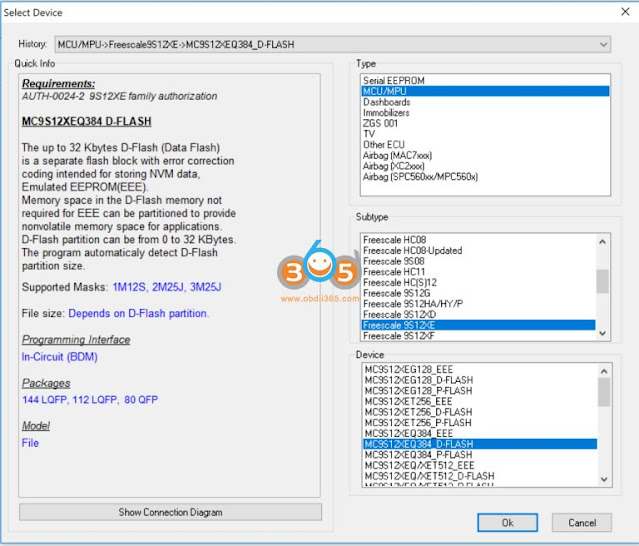
Open XProg and select: "MCU/MPU" -> "Freescale 9S12XE" -> "MC9S12XEQ384_D-FLASH"

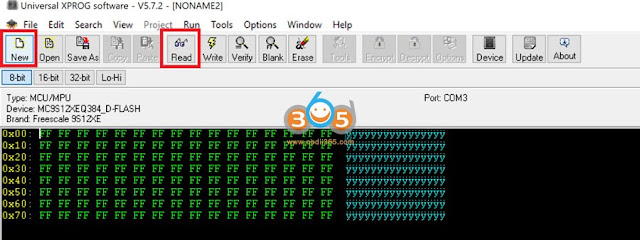
Open a new hex file to download the D-FLASH. Click "New". Click "Read"

At this point XProg will connect, check certificates, then set up BDM. It will probably tell you the flash is corrupted, you need to select 0k of EEPROM and 32k of FLASH (This is the default).

Once the download is complete, save the D-FLASH. Open the D-FLASH using tomvleeuwen's app or webpage - http://tlvps.tomvanleeuwen.nl/frm/ . If you use the app it will ask you to open the D-FLASH you just saved, then ask you where you want to store the new EEPROM (I used the app, as my computer needed to be offline to use XProg)

Open the newly created EEPROM file in XProg

Change the device to: "MCU/MPU" -> "Freescale 9S12XE" -> "MC9S12XEQ384_EEE"

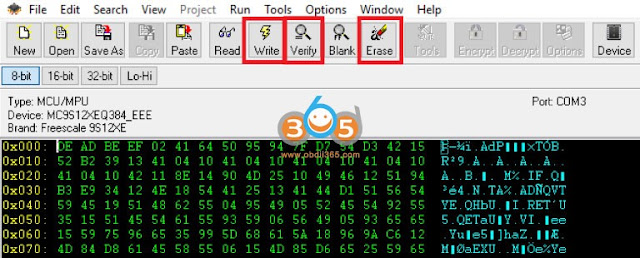
Erase the FRM. Change "Sectors" to "16".

Click "Write"

Click "Verify". You may need to run the "Erase"/"Write"/"Verify" sequence multiple times before it verifies correctly. If you get a "device silent" error, try again. This is typically caused by a lower quality USB cable, or the XProg/FRM cables are slightly too long.

Click "New". Click "Read" Your newly read FRM EEE should match. If you read the D-Flash again, it should come back empty (0x0). This is good.

Reinstall in the car, and you should be good to go!

http://blog.obdii365.com/2022/01/14/downgrade-xprog-china-clone-to-stable-version/

Thursday, January 13, 2022

Convert FRM3 D-flash to EEE and Repair by XPROG

 Q: Looking to do BMW FRM3 programming and looking at purchasing the Xhorse VVDI Prog. I am curious if I were to get a corrupted FRM3 read is there a cloud database Xhorse has that will have a good eeprom file to flash back into the corrupted FRM3? As long as its a compatible ID of course. I could not find any software to convert the D-flash to eeprom.


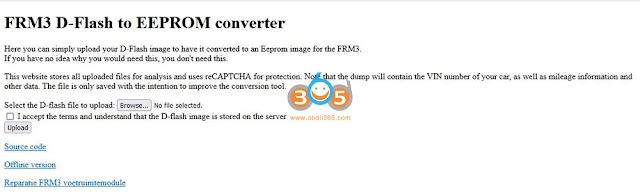
A: Yes, you can use this tool: http://tlvps.tomvanleeuwen.nl/frm/

The best way to repair FRM module seems to be reading dFlash memory. When you try to read it, the programmer tells you the partition is correct and then you choose the size of EEPROM of 0 sectors - then you read full dflash.   You can download the dflash to eee convertor, convert the data and write back as eee.

This tool allows the currupt data in the microprocessor to be read, even after the eeprom not corrupted. This is done by reading the d-flash contents from the microprocessor using an appropriate programmer (like xprog, vvdi prog, orange5, upa etc), after which this program can convert it to an eeprom image which can then be programmed to the simulated eeprom area again using the same programmer.

convert frm3 d-flash to eeprom

How to use the D-FLASH to EEPROM converter:

Example 1: 

Repairing BMW FRM3 with vvdi prog (incl. convert D-flash to EEPROM).


Example 2:

Repair FRM3 with xprog China clone

xprog-repair-bmw-frm3-1

1. Prep the solder points. They are large test points that take rosin-core solder quite readily - Nice and easy to solder.

xprog-repair-bmw-frm3-2


2. Solder the wires to the test points. Your colours may vary if you received a different wiring harness with your XProg.

xprog-repair-bmw-frm3-3

3. You don't need to use the daughterboard, but I figured it wouldn't hurt. Here are the labels from the HC(S)12 adapter board:

xprog-repair-bmw-frm3-4

4. Wire colours, if you have a matching harness:

xprog-repair-bmw-frm3-5

So the soldering is done, now its time for the programming.

5. Open XProg and select: "MCU/MPU" -> "Freescale 9S12XE" -> "MC9S12XEQ384_D-FLASH"

xprog-repair-bmw-frm3-6

6. Open a new hex file to download the D-FLASH.
a. Click "New"
b. Click "Read"
c. At this point XProg will connect, check certificates, then set up BDM. It will probably tell you the flash is corrupted, you need to select 0k of EEPROM and 32k of FLASH (This is the default).

xprog-repair-bmw-frm3-7

7. Once the download is complete, save the D-FLASH. Open the D-FLASH using tomvleeuwen's app or webpage - http://tlvps.tomvanleeuwen.nl/frm/ . If you use the app it will ask you to open the D-FLASH you just saved, then ask you where you want to store the new EEPROM (I used the app, as my computer needed to be offline to use XProg)

8. Open the newly created EEPROM file in XProg

xprog-repair-bmw-frm3-8

9. Change the device to: "MCU/MPU" -> "Freescale 9S12XE" -> "MC9S12XEQ384_EEE"

xprog-repair-bmw-frm3-9

10. Write the new EEPROM to the FRM3
a. Click "Erase". Yes I am sure. Yes the flash is corrupted - Fix it.
b. Click "Write"
c. Click "Verify".
d. Run the "Erase" / "Write" / "Verify" three times to get it to verify correctly.

xprog-repair-bmw-frm3-10

DO NOT PANIC - If you read the D-FLASH again, it will come back empty (0x0). This is normal and desired behaviour.

Reinstall into the car, and everything should work the way you want!

Seriously took about 5 minutes to read the D-Flash, generate the EEProm, and write it back once the solder points were connected. When you plug the module back into the car, it worked perfectly.

You can connect and read the dflash with the autel xp400 (im608) as well. You'll have to check within the programmer section. Once you read the dflash, you can upload to the converter above and it will generate repaired eeprom. Then you write the generated eeprom file via xp400 and your FRM is fixed.

Some programmers (like Orange5) allow you to read D-flash while the partition table is not corrupt. Hence you were able to find the D-flash dump from a good unit.

Also, it might seem that D-Flash is empty if you only look at the first sector, since it is possible that the first sector is empty but there is some data further down in the file. I wondered once for a long time why it was empty, so just a warning for everyone trying to recover via D-flash.


Related reading:

Top 7 BMW FRM3 Repairing Tools Reviews + Procedure

Monday, June 29, 2020

Xprog V6.12 Certificate Expired or Validated Error Solution

Problem:
I've bought a Clone Xprog 6.12, but when select any mcu to read it always says that “the certificate has expired or is not validated. Do you want to update it now”
I've disabled any antivirus software.
How can i solve this problem?
Xprog V6.12 Certificate Expired or Validated Error
Possible reason:
It is not caused by software nor operating system (Winxp, Win7 etc).
You have connected the USB dongle and run an upgrade online.  Xprog v6.12 software CANNOT be updated online.  Otherwise x-prog will be locked.


Solution:
1. Order a replacement CPU and change the CPU by yourself.
2. If you don't know how to change CPU, send the xprog unit back for repair.

Contact obdii365.com customer service to get replacement CPU:
Whatsapp: +86 18259252285
Email: Sales@OBDII365.com
Skype: OBDII365.com

Thursday, May 28, 2020

Xprog, Orange5, iprog, which better to program eeprom?

I have xprog 5.55 clone a couple of years and never let me down mate. newer versions have issues.
also upa clone, old but still good, tl866 clone, and orange too
with little knowledge and searching in forum (DK or MMH) you can rework most of them and never have problems
They are pretty cheap so I suggest ,—-if you do it as a hobby—-,buy both xprog and upa with all their adapters.
But surely original devices have plenty of advantages.

Orange5:
– A must have
. You can’t avoid to get it if you want to do the car work seriously. Good for EEPROMs, MCUs, has a good Immo-content. This immo-part can be very helpful: in many cases you have only to solder some vires to the PCB, and you can read/write the needed content. Contains tons of pictures of immo-boxes, ECUs, and other PCBs; chip pinouts, and lots of useful information. The basic kit costs only €350, I suggest to pay a bit more, and buy all the needed connectors with the basic kit: SOIC8 DIP8, SOIC8 14 soldering, SSOP8, Lead with clips POMONA SOIC8 & DIP8, PQFP52 PQFP80, TMS374, 912 908 and 705E6 in-circuit leads, HC11ES and 05B6 WDT VW chip connectors (be getle with ’em, otherwise you have to buy a new one after 5-10 uses), ST62xx, 908AS60/AZ60 QFP64, all Motorola connectors. You will see how often do you use this connectors, and you can re-order the frequently needed ones.

– orange5 is best for old motorola like 3d33j or 1d62j eeprom too.

– Orange5 you must push disable security button 1st on some.

– Orange5 plus v1.35 is newly available (full kits for $199 with USB Dongle and Full Adapter Full Packet Hardware + Enhanced Function Software) .
Difference between xprog version (v5.55 v5.60 v5.74 v5.84 v6.12):
– a higher sw version supports more mcu´s /eeprom a.s.o.
but some of this protocols even not work correctly on clones…
when you have a specific mcu, make a research on google and read comments on forum about possibilities read/write…

XProg-M:
– Good tool, but not necessary to have (or get a Chinese one). It was the first one what I had, but you can find where it leaks sooner as you could think. It was and is a very good eprommer. Very good if you have to deal with Motorola’s, but not so universal than the O5, or the VVDI Prog. If you buy the original one, it can be expensive: €2000 for the full set with all the sw authorization and connectors, but you can get the Chinese clone of v5.5 from $50 and Xprog V6.12 with USB dongle for $179.
Warning: The cheap version can cause troubles, because it is built from cheapest parts. Sometimes 0.01 V difference can cause expensive troubles

– Use xprog only for old ews3 and work well .

– Occasionally the old xprog will come out the box but not very often anymore.

– Be careful with whatever kit u buy – vvdi for example it’s easy to select 6 pin eeprom instead of 8.

iprog+ clone: not so good for eeprom
I’ve managed to read eeproms with iprog, but I wouldn’t recommend it. Use the Eeprom adapter, pin #1 is where the lever is.

To be upgrading…

Sunday, May 24, 2020

Xprog v5.84 Access violation Error Solution

Xprog m box v5.84 error "Access violation at address 00616DC6 in module "XProgDesktop.dll".
Read of address 00000000."
xprog-access-violation-
Solution:
Please install the ADOBE reader in software CD. It should be fine. 

Thursday, March 12, 2020

Xprog M Box V6.12 vs. Xprog V5.84

New Xprog M software 6.12 and 5.84 which version reads more?

Xprog 6.12 adds 4 new adapters ADP-0006 M35080 ICP, QFP64 MC908AZ/AS603K85K, ADP-0019 Rev. B, QO18S714. 

But actually xprog 5.84 does more than V6.12.


V6.12 missing following MCUs which xprog 5.84 will do. 

 Dashboards
Audi
AUDI A3 2007
AUDI TT 2008

BMW
E38-M35080
E39-M35080
E46-M35080
E46-M35080-BOSCH
E53-M35080
E65-M35080
X3-E83-M35080

CDC32xx24C32-Tool
1K0920863B
1K0920864B
1K0920873B
1K0920874B
1K0920972D
1K6920972E
1K6920974B
100920873A
1T0920864A
1T0920874A
1Z0920812D
1K0920863B
1K0920864B
1K0920873B
1K0920874B
1K0920972D
1K6920972E
1K6920974B
1009208734
1T09208644
1T09208744
1Z0920812D
1Z0920842D
1Z0920842E
1Z0920912D
3C0920852S
3C0920871D
8J0920930E
8P0920901K
8P0920931B
8P0920931E


Renalt Clio IV
MC9S12XHY256_ D-FLASH
MC9S12XHY256_ P-FLASH

SKODA

DCTAVIA 2006
OCTAVIA II 2007

VW
Caddy 2006
Caddy 2008
GOLF V from 072006
JETTA until 07-2006
JETTA from 07-2006
PASSAT CDC3217
PASSAT CDC3297
Touran 2007
Immobilizers
BMW
EWS 3
EWS 3/2D47J/

CAS4 1N35H 5M48H man.date from 1030 v2
INC5H_ 5M48H_ D-FLASH_ BACKUP_ v2
1N35H_ 5M48H_ P-FLASH_ BACKUP_ v2
1N35H__5M48H_ D-FLASH_ v2
1N35H_ 5M48H_ P-FLASH_ v2
MC9S12C64-FLASH

CAS4 1N35H 5M48H man.date from 1030 v1
1N35H 5M48H_ D-FLASH BACKUP _v1
1N35H 5M48H_ P-FLASH BACKUP_ v1
1N35H 5M48H_ D-FLASH_v1
1N35H 5M48H_P-FLASH_v1
MC9S12C64-FLASH

CAS4 1N35H 5M48H man.date up to 1008 v1
1N35H 5M48H_ D-FLASH BACKUP _v1
1N35H 5M48H_ P-FLASH BACKUP_ v1
1N35H 5M48H_ D-FLASH_v1
1N35H 5M48H_P-FLASH_v1
MC9S12C64-FLASH

Yamaxa
T-MAX Type I 9S12T64
T-MAX Type_ II 9S12T64

VW
VW_ KESSY EEE Secured
VW_ KESSY P-FLASH-Secured
 Airbag [XC2xxx]
AL34-14B321 -FA(XC2361A-56)
AL34-14B321-FA flash0
AL34-14B321 FA flash1
AL34-14B321-FA flash3

BJ32-14D374-AC(XC2361A-56)
BJ32-14D374-AC flash0
BJ32-14D374-AC flash1
BJ32-14D374-AC flash3

KD35-57K30B-(XC2361A-56)
KD35-57K30B flash0
KD35-57K30B flash1
KD35-57K30B flash3

AL34-14B321 -FA(XC2361B-40)
AL34-14B321-FA flash0
AL34-14B321-FA flash1

BR33-14B321 -AF(XC2060N-40)
BR33-14B321-AF flash0
BR33-14B321-AF flash1

FR3T-14B321 -AF(XC2336A-72)
FR3T-14B321-AF flash0
FR3T-14B321-AF flash1
FR3T-14B321-AF flash3 


  Airbag [SPC56xxx/MPC560x]
Honda_ Acord(SPC564P54L3)
SPC564P54Lx DATA flash
SPC5604P54Lx_ CODEL flash

Honda_ CR-V(SPC560P50L3)
Code Flash
Data_ Flash

Honda_ Jazz(SC667051 /MPC5604P 0M26V)
Code Flash
Data_ Flash
Renault(SPC560P50L3)
Code Flash
Data_ Flash
VW__Golf7(SPC560P50L3)
Code Flash
Data_ Flash

  Airbag [Renesas]
Peugeot Citroen(D70F3524)
uPD70F3624_ Code Flash(SPI)
uPD70F3624_ Data Flash[SPI]

Opel Mokka 2016 (D70F3548)
uPD70F3548/49/50 Data Flash
uPD70F3548_ Code_ Flash

Related post:


Sunday, February 16, 2020

Free Download and Install Xprog V6.12 Software

Latest version Xprog V6.12 box programmer software can be downloaded here for free:
Software version: V6.12, Firmware: V4.4
Password: fxo5qz
or download from google drive here
https://drive.google.com/open?id=1kJQot_4d_m3i4RlFCW00Nh9O3dZbgm4L
xprog-new-license
What’s new in xprog 6.12?
xprog-612-pcb-1

xprog-612-pcb-2

xprog-612-pcb-3

xprog-612-pcb-4
How to install Xprog v6.12 software?
  • Operating system: WinXP/Win7 32bit and 64 bit
  • Disconnect the internet. Disable anti-virus program.
  • With USB Dongle, No need activation
Step 1: Install Adobe Reader
Open software CD or download software via links
install-xprog-v612-software-1

Copy and paste all files from CD to desktop
install-xprog-v612-software-2

Open 6.12 AdbeRdr11000_mui_Std folder and install AcroRead setup
Press Next
install-xprog-v612-software-3

Select Manually check for and install updates and press Install
Installing Adobe Reader XI
Adobe setup installation completed.
Press Finish.
Delete 6.12 AdbeRdr11000_mui_Std folder on desktop

Step 2: Merge registry 
Cut English 6.12 software folder from desktop and paste to C://
install-xprog-v612-software-4

Open English 6.12 software folder
install-xprog-v612-software-5

Send XprogDesktop to desktop
install-xprog-v612-software-6

Merge 6.12registry
Confirm registry information by pressing Yes
install-xprog-v612-software-7

Mergen registry successfully
Delete Chinese software 6.12 folder, installation video and Adobe Reader XI on desktop

Step 3: Install xprog driver
Connect xprog v6.12 and usb dongle with computer
install-xprog-v612-software-8

Open Computer Management->Device Manager->Other devices->Xprog Box, right click and select Update Driver Software
install-xprog-v612-software-9

Choose Browse for driver software on your computer
Choose driver software location (from desktop driver folder)
Press Next
install-xprog-v612-software-10
install-xprog-v612-software-11

Install driver software success and COM Port was set to 6
(* If fail to uninstall device driver, make sure you select the correct driver folder and system (32bit or 64bit).
Step 4: Run software
Run XprogDesktop.exe shortcut on desktop as Administrator
Accept license agreement
install-xprog-v612-software-12

Check device information and run xprog software

install-xprog-v612-software-13

install-xprog-v612-software-14

Friday, October 18, 2019

Xprog 6.12 programmer – What’s new?

Here will come the latest Xprog 6.12 full kit.
Xprog programmer 6.12 features new authorizations and adapters and new inner board. That is what the difference lie in Xprog 5.84 and 6.12.

Now, we’ll talk about the difference:
  1. Items in parcel
  2. PCB
  3. Authorization

in detail..

  1. Xprog 5.84 and 6.12 full kit
xprog-v584-full-kit
xprog-v612-full-kit

Note: Xprog 6.12 comes with 4 new adapters:
ADP-0006 M35080 ICP, QFP64 MC908AZ/AS603K85K, ADP-0019 Rev. B, QO18S714
xprog-v612-new-adapter

Xprog 6.12 full adapter list:
ADP-0019 Rev.B —-New!
ADP-0006 M35080 ICP adapter —New!
QFP64 MC908AZ/AS60 3K85K adapter —New!
QO18S714 —New!

ADP-0001 TMS370 PLCC28 programming adapter
ADP-0002 TMS370 PLCC44 programming adapter
ADP-0003 TMS370 PLCC68 programming adapter
ADP-0004 Motorola HC05B/X PLCC52 programming adapter
ADP-0005 Motorola HC05B/X QFP64 programming adapter
ADP-0006 ST M35080 in-circuit programming adapter
ADP-0008 TMS374 family in-circuit programming adapter
ADP-0009 MC68HC05V12 programming adapter
ADP-0010 TMS374 on-board programming adapter
ADP-0011 HC11EA9/E9 programming adapter
ADP-0017 HC(S)12 BDM / ARM Micronas in-circuit programming/bypass security adapter
Additional adaptor for 5M48H P-Flash
ADP-0019 Rev.A
EWS3 adaptor
EEPROM adaptor
QFP28 adaptor
QFP64 adaptor
QFP80 adaptor
QFP112 adaptor
QFP144 adaptor

  1. Xprog 5.84 and 6.12 pcb
xprog-v584-pcb
xprog-v612-pcb

Note: Version 6.12 hardware is better since the board is updated.
It runs more steady and faster than old version.

  1. Xprog 5.84 and 6.12 authorization
Note: Xprog 6.12 has new authorization:
AUTH-0028-3 Renesas RL78 Authorized
and AUTH-0028-4 Renesas M32C Authorized
xprog-v612-new-authorization

XPROG V6.12 full authorization:

AUTH-0001 Motorola HC05 family authorization (allows to read/write EEPROM)
AUTH-0002 Motorola HC08 family authorization (allows to read/write EEPROM)
AUTH-0003 Motorola HC11 family authorization (allows to read/write EEPROM)
AUTH-0004 Motorola HC12, 9S12 family authorization (allows to read/write EEPROM and flash memory)
AUTH-0005 Texas Instruments TMS370/TMS374 family authorization (allows to read/write EEPROM)
AUTH-0006 Motorola HC05Bxx and HC05Xxx family bypass security authorization (allows to read/write secured EEPROM and flash memory)
AUTH-0007 ST M35080 authorization. Read/Write/Erase device to delivery state.
AUTH-0008 BMW EWS3 authorization
AUTH-0009 ATMEGA family authorization (allows to read/write EEPROM and flash memory)
AUTH-0010 MB ZGS001 authorization
AUTH-0011 Motorola HC11EA9/E9 bypass security authorization (allows to bypass security bit and read EEPROM and RAM memory)
AUTH-0012 National CR16 authorization (allows to read/write EEPROM memory)
AUTH-0014 ST7, ST10 family authorization (allows to read/write internal flash)
AUTH-0015 MPC5xx authorization (depending on device program automatically detects MPC5xx, M95xxx device type, flash, external flash and configuration memory size)
AUTH-0018 Motorola HC12, HC912, MC9S12, MC9S12X bypass security authorization (allows to read/write secured EEPROM and flash memory)
AUTH-0020 ARM (Micronas, …) Family authorization (allows to read/write internal flash and external serial EEPROM)
AUTH-0021 ARM (Micronas, …) Family bypass security authorization (allows to read/write secured and non-secured internal flash and external serial EEPROM, view/change mileage, Chassis number (VIN), serial number and PIN code).
AUTH-0023-1 MAC7xxx
AUTH-0023-2 XC23xx
AUTH-0024-1 MC9S12Cxx
AUTH-0024-2 MC9S12XE
AUTH-0024-3 9S12XE SECURITY
AUTH-0024-4 MC9S12HA/HY/P
AUTH-0025-1 MPC/SPC5xxx Authorized 2016/3/13
AUTH-0027-1 HC(S)908 update Authorized 2016/3/13
AUTH-0027-2 HC(S)908 sercurity Authorized 2016/3/13
AUTH-0028-1 Renesas V850 Authorized 2017/10/9
AUTH-0028-2 Renesas SuperH Authorized 2017/10/9
AUTH-0028-3 Renesas RL78 Authorized  —New!
AUTH-0028-4 Renesas M32C Authorized —New!
xprog-v612-new-authorization-1

xprog-v612-new-authorization-2

xprog-v612-new-authorization-3

xprog-v612-new-authorization-4

xprog-v612-new-authorization-5

xprog-v612-new-authorization-6

xprog-v612-new-authorization-7

xprog-v612-new-authorization-8

xprog-v612-new-authorization-9

xprog-v612-new-authorization-10

xprog-v612-new-authorization-11

xprog-v612-new-authorization-12

xprog-v612-new-authorization-13

xprog-v612-new-authorization-14