How to: correct mileage on Citroen c elysee 2015 with xprog m box ecu programmer (here using version v5.55).
Original odometer: 186,854 KM
Wiring connection to xprog
Mileage after correction: 71,086 KM
(Click to enlarge)
Video guide:
https://vimeo.com/302783757
Monday, November 26, 2018
Sunday, October 28, 2018
Free Download Xprog m Box V5.84 Software
Here you can download V5.84 software for Xprog M box clone.
Software version: V5.84, Firmware:V4.4
With USB Dongle, No need to activate
Firmware 4.4:
Add new authorization: AUTH-0028-1 Renesas V850 Authorized and AUTH-0028-2 Renesas SuperH Authorized 2017/10/9Language: English
XPROG-M V5.84 Authorizations:
AUTH-0001 Motorola HC05 family authorization (allows to read/write EEPROM)
AUTH-0002 Motorola HC08 family authorization (allows to read/write EEPROM)
AUTH-0003 Motorola HC11 family authorization (allows to read/write EEPROM)
AUTH-0004 Motorola HC12, 9S12 family authorization (allows to read/write EEPROM and flash memory)
AUTH-0005 Texas Instruments TMS370/TMS374 family authorization (allows to read/write EEPROM)
AUTH-0006 Motorola HC05Bxx and HC05Xxx family bypass security authorization (allows to read/write secured EEPROM and flash memory)
AUTH-0007 ST M35080 authorization. Read/Write/Erase device to delivery state.
AUTH-0008 BMW EWS3 authorization
AUTH-0009 ATMEGA family authorization (allows to read/write EEPROM and flash memory)
AUTH-0010 MB ZGS001 authorization
AUTH-0011 Motorola HC11EA9/E9 bypass security authorization (allows to bypass security bit and read EEPROM and RAM memory)
AUTH-0012 National CR16 authorization (allows to read/write EEPROM memory)
AUTH-0014 ST7, ST10 family authorization (allows to read/write internal flash)
AUTH-0015 MPC5xx authorization (depending on device program automatically detects MPC5xx, M95xxx device type, flash, external flash and configuration memory size)
AUTH-0018 Motorola HC12, HC912, MC9S12, MC9S12X bypass security authorization (allows to read/write secured EEPROM and flash memory)
AUTH-0020 ARM (Micronas, …) Family authorization (allows to read/write internal flash and external serial EEPROM)
AUTH-0021 ARM (Micronas, …) Family bypass security authorization (allows to read/write secured and non-secured internal flash and external serial EEPROM, view/change mileage, Chassis number (VIN), serial number and PIN code).
AUTH-0023-1 MAC7xxx
AUTH-0023-2 XC23xx
AUTH-0024-1 MC9S12Cxx
AUTH-0024-2 MC9S12XE
AUTH-0024-3 9S12XE SECURITY
AUTH-0024-4 MC9S12HA/HY/P
AUTH-0025-1 MPC/SPC5xxx Authorized 2016/3/13
AUTH-0001 Motorola HC05 family authorization (allows to read/write EEPROM)
AUTH-0002 Motorola HC08 family authorization (allows to read/write EEPROM)
AUTH-0003 Motorola HC11 family authorization (allows to read/write EEPROM)
AUTH-0004 Motorola HC12, 9S12 family authorization (allows to read/write EEPROM and flash memory)
AUTH-0005 Texas Instruments TMS370/TMS374 family authorization (allows to read/write EEPROM)
AUTH-0006 Motorola HC05Bxx and HC05Xxx family bypass security authorization (allows to read/write secured EEPROM and flash memory)
AUTH-0007 ST M35080 authorization. Read/Write/Erase device to delivery state.
AUTH-0008 BMW EWS3 authorization
AUTH-0009 ATMEGA family authorization (allows to read/write EEPROM and flash memory)
AUTH-0010 MB ZGS001 authorization
AUTH-0011 Motorola HC11EA9/E9 bypass security authorization (allows to bypass security bit and read EEPROM and RAM memory)
AUTH-0012 National CR16 authorization (allows to read/write EEPROM memory)
AUTH-0014 ST7, ST10 family authorization (allows to read/write internal flash)
AUTH-0015 MPC5xx authorization (depending on device program automatically detects MPC5xx, M95xxx device type, flash, external flash and configuration memory size)
AUTH-0018 Motorola HC12, HC912, MC9S12, MC9S12X bypass security authorization (allows to read/write secured EEPROM and flash memory)
AUTH-0020 ARM (Micronas, …) Family authorization (allows to read/write internal flash and external serial EEPROM)
AUTH-0021 ARM (Micronas, …) Family bypass security authorization (allows to read/write secured and non-secured internal flash and external serial EEPROM, view/change mileage, Chassis number (VIN), serial number and PIN code).
AUTH-0023-1 MAC7xxx
AUTH-0023-2 XC23xx
AUTH-0024-1 MC9S12Cxx
AUTH-0024-2 MC9S12XE
AUTH-0024-3 9S12XE SECURITY
AUTH-0024-4 MC9S12HA/HY/P
AUTH-0025-1 MPC/SPC5xxx Authorized 2016/3/13
AUTH-0027-1 HC(S)908 update Authorized 2016/3/13
AUTH-0027-2 HC(S)908 sercurity Authorized 2016/3/13
AUTH-0028-1 Renesas V850 Authorized 2017/10/9
AUTH-0028-2 Renesas SuperH Authorized 2017/10/9
XPROG-M V5.84 Adapters:
ADP-0001 TMS370 PLCC28 programming adapter
ADP-0002 TMS370 PLCC44 programming adapter
ADP-0003 TMS370 PLCC68 programming adapter
ADP-0004 Motorola HC05B/X PLCC52 programming adapter
ADP-0005 Motorola HC05B/X QFP64 programming adapter
ADP-0006 ST M35080 in-circuit programming adapter
ADP-0008 TMS374 family in-circuit programming adapter
ADP-0009 MC68HC05V12 programming adapter
ADP-0010 TMS374 on-board programming adapter
ADP-0011 HC11EA9/E9 programming adapter
ADP-0017 HC(S)12 BDM / ARM Micronas in-circuit programming/bypass security adapter
Additional adaptor for 5M48H P-Flash
ADP-0002 TMS370 PLCC44 programming adapter
ADP-0003 TMS370 PLCC68 programming adapter
ADP-0004 Motorola HC05B/X PLCC52 programming adapter
ADP-0005 Motorola HC05B/X QFP64 programming adapter
ADP-0006 ST M35080 in-circuit programming adapter
ADP-0008 TMS374 family in-circuit programming adapter
ADP-0009 MC68HC05V12 programming adapter
ADP-0010 TMS374 on-board programming adapter
ADP-0011 HC11EA9/E9 programming adapter
ADP-0017 HC(S)12 BDM / ARM Micronas in-circuit programming/bypass security adapter
Additional adaptor for 5M48H P-Flash
ADP-0019 Rev.A
EWS3 adaptor
EEPROM adaptor
QFP28 adaptor
QFP64 adaptor
QFP80 adaptor
QFP112 adaptor
QFP144 adaptor
EWS3 adaptor
EEPROM adaptor
QFP28 adaptor
QFP64 adaptor
QFP80 adaptor
QFP112 adaptor
QFP144 adaptor
Free Download Xprog V5.84 Software
Xprog 5.84 software installation tips:
Operating system:
1. Windows XP 32bit OR windows 7 64 bit, all the patch software for the windows system should be installed already and the windows properly works well…
2. The windows system should be with at lest 2 partitions (except the CD ROM.)
3. Can not be working with virtual hard disk.
How to install xprog V5.84 on Windows 7?
Installation steps:
1. Click the file “installation.reg”, get the file information to the regedit.
2. Install the file “AdbeRdr11000_zh_CN.exe”, it is a must, otherwise the Xprog software will not start.
3. Plug the Xprog main interface to the computer, install the USB driver.
4. Copy the folder “XPROG-BOX5.84” to the desktop, and open it, and run the “xprogdesktop.exe”, then software open.
Friday, October 12, 2018
Xprog read BMW EWS3 mask 2D47J MCU
Q: Could I use xprog-m to read EWS3 mask 2D47J mcu? Does it work fine?
A: Yes you can,works fine.
ews3 2D47J can read/write in circuit with xprog.
but you need lift pin TXD 2D47J
You will erase eeprom everytime. If you want to read 2D47J through Kline then you must first remove the MCU from circuit board and then read in adaptor 2 times first, this will bypass the chips security, you can then solder back to board and read through KLine.
If it is with K-line, desolder it ,and read with ETL - is the best and safer way
through k-line is lottery.
A: Yes you can,works fine.
ews3 2D47J can read/write in circuit with xprog.
but you need lift pin TXD 2D47J
You will erase eeprom everytime. If you want to read 2D47J through Kline then you must first remove the MCU from circuit board and then read in adaptor 2 times first, this will bypass the chips security, you can then solder back to board and read through KLine.
If it is with K-line, desolder it ,and read with ETL - is the best and safer way
through k-line is lottery.
Tuesday, September 18, 2018
How to Repair or Unlock ATMEGA64 on Xprog M
Here’s the customer solution to help users solve the problem xprog atmega64 locked and can not read or program chip issue.
This is done off board with qfp64 breakout board should be able to program onboard xprog also though.
Disclaimer: Many thanks dil6222 from cartechnology.co.uk forum. You are at your risk.
Easy fix all you need is:
1. UPA USB PROGRAMMER
2. USBASP WITH SLOW CLOCK JUMPER ON
EXTREME BURNER SOFTWARE AND 10 TO 6PIN ADAPTER
3. JUMPER WIRES FEMALE AND MALE
4.QFP64 BREAKOUT BOARD
let’s get started
1. First of all connect jumper wires between atmega and usbasp
you will need to split vcc + into 3 wires and gnd – into 3 wires
Connect vcc+ to pin 21,52 and (64 i believe optional as for avcc i test later)
Connect gnd- to pin 22,53 and 63
Connect SCK to SCK
Connect RESET to RESET
MOSI to PE0 (common problem is people using PB2 and PB3 as there listed as mosi and MISO but they are not )
MISO to PE1
You should end up with something like this . you can see I’ve split the and vcc
2. Next connect PIN2 from UPA DB9 SOCKET to XTAL 1.
Now connect everything else usbasp and upa to usb etc
Now comes the fun bit
3. Open upa software go on tools then pulse generator and you will see this:
Change frequency to 1000khz and click start and leave it running.
4. Open extreme burner avr and go to fuse settings tab and click on read
atmega should connect as normal
5. Go on each set of fuses low, high, extended lock go on bit details and click load default value for each set
Then tick all the write boxs and click write. or you can manually enter the following
( Low E1, HIGH 99, EXTENDED FD, LOCK FF then click write these are factory lockbits. see photo
Then tick all the write boxs and click write. or you can manually enter the following
( Low E1, HIGH 99, EXTENDED FD, LOCK FF then click write these are factory lockbits. see photo
6. Go on low fuses and check the following clksel settings are there
Cksel0 (1)
Cksel1 (0)
Cksel2 (0)
Cksel3 (0)
Cksel1 (0)
Cksel2 (0)
Cksel3 (0)
Now erase chip and then disconnect upa
That’s it all done it should be able to program/ read as normal without upa sending signal to xtal1 on mega.
Hope this helps many users to unlock Xprog atmega 64.
Thursday, September 13, 2018
How to Read Audi A6 2005-2011 ELV MC9S12 with Xprog
OEM= 4F0905852B
MCU= MC9S12 3L40K
Read as secured
I have done 4pc of this unit last month.
Short cables max 12cm long.
When it don’t read always try to lift reset pin
(I have never done it but some Xprog is sensitive and then try lift reset)
Operate by following my instruction, one friend used the adapter (BDM) and wires with a length of 10 cm. RESET leg lift.
Sunday, September 9, 2018
How to remove BMW Airbag 240 "Internal error" with Xprog
On the example of the control unit Temic 6577-6900727, he himself MRSZ3 V. 2.5-V. 3.0. I will show you how to remove 240 "Internal error" error. This airbag has been installed in BMW e39, е38 and е46.
For this you need a xprog box programmer that will be able to read the data from this ECU. We just need to record new memory without errors in the Motorola MC68HC12b32 element.
See the connection point below in the picture. Next, we take a clean memory, without errors, and save it using the xprog-m programmer in the Motorola element. Next, we set the control unit back to the car and we enjoy the capable system of safety again.
For this you need a xprog box programmer that will be able to read the data from this ECU. We just need to record new memory without errors in the Motorola MC68HC12b32 element.
See the connection point below in the picture. Next, we take a clean memory, without errors, and save it using the xprog-m programmer in the Motorola element. Next, we set the control unit back to the car and we enjoy the capable system of safety again.
(Click to enlarge)
Thursday, August 23, 2018
How to read BMW Freescale MC9S12D64 with Xprog V5.60
Here's the DIY guide for those whom want to get tripple blinker on their BMW E46.
DIY:
1) you need LSZ module with =>SW3.6 on sticker
2) xprog v5.55 v5.60 or above with mc9s12 bdm adapter
3) sticked dump of ci37 (eeprom virgined, need to be coded after installing ecu to car)
wires color legend (follow xprog box connection manual for mc9s12d64):
blue - reset
red - VCC
green - BKGD
yellow - xclks
white - extal
gray - GND
ground wire instead of soldering to pcb can be ezly connected to pin 32 in connection socket.
DIY:
1) you need LSZ module with =>SW3.6 on sticker
2) xprog v5.55 v5.60 or above with mc9s12 bdm adapter
3) sticked dump of ci37 (eeprom virgined, need to be coded after installing ecu to car)
wires color legend (follow xprog box connection manual for mc9s12d64):
blue - reset
red - VCC
green - BKGD
yellow - xclks
white - extal
gray - GND
ground wire instead of soldering to pcb can be ezly connected to pin 32 in connection socket.
(Click to enlarge)
Result here:
Result here:
Tuesday, August 14, 2018
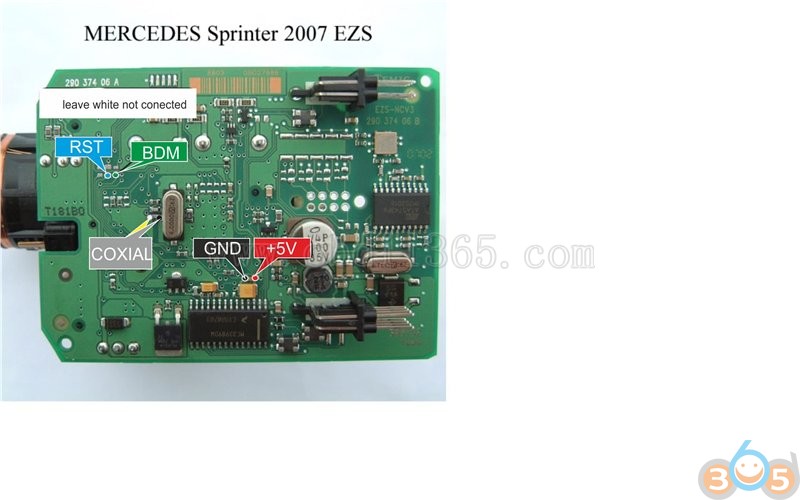
Benz Sprinter 2010 EZS Soldering Pinouts to Xprog
Purpose:
Do odometer correction on 2010 Sprinter Van. I need the soldering points for the ezs/eis.I can't actually see the mask but after extensive reading every points to them having the 0L01Y mask. Which programmer will work?
Solution:
R260 original ok
clone rosfar,ok
xprog clone ok
R270 ok
Use xprog the pinouts for xprog is what posted below. i always do this with xprog and never had a problem just select in device options " read and verify " make sure it is NOT selected and you should be ok , use the BDM adaptor with xprog for it
here is the settings i use and you know the story always keep backup of the files you read


BTW:
Here are R270 wires:
2- +5v
24,26- ground
7- reset
19- background

Solution:
R260 original ok
clone rosfar,ok
xprog clone ok
R270 ok
Use xprog the pinouts for xprog is what posted below. i always do this with xprog and never had a problem just select in device options " read and verify " make sure it is NOT selected and you should be ok , use the BDM adaptor with xprog for it
here is the settings i use and you know the story always keep backup of the files you read


BTW:
Here are R270 wires:
2- +5v
24,26- ground
7- reset
19- background

Sunday, August 12, 2018
BMW F series Airbag MAC7241 Pinout to Xprog
How to use Xprog m box ecu programmer to read BMW F series Airbag?
Check pinouts below:
http://www.obdii365.com/producttags/xprog.html
Check pinouts below:
http://www.obdii365.com/producttags/xprog.html
Tuesday, August 7, 2018
Read Volvo S40/V50/C30/C70 MCU MC9S12DG256
Read Volvo S40/V50/C30/C70 2004 MCU MC9S12DG256 80 QFP by xprog m box ecu programmer.
Picture and pinout attached:
Click to enlarge all images.
http://www.obdii365.com/wholesale/v570-xprog-m-ecu-programmer.html
Picture and pinout attached:
Click to enlarge all images.
http://www.obdii365.com/wholesale/v570-xprog-m-ecu-programmer.html
Subscribe to:
Posts (Atom)