Sunday, May 13, 2018

How to Repair BMW FRM3 with Xprog V5.60 in 2 Minutes

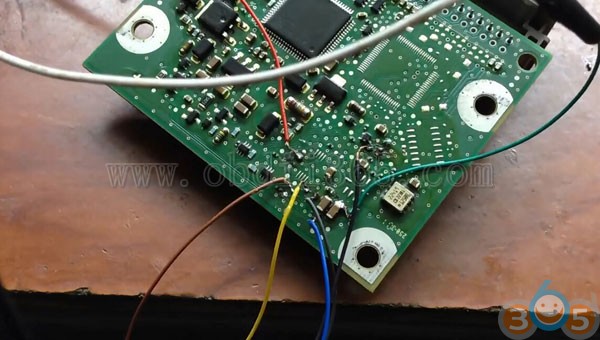
How to: repair BMW E70  FRM3 (BMW Footwell Module) 3M25J 9S12XEQ384 by xprog v5.60 programmer within 2 minutes.


BMW FRM pinout to Xprog m box

bmw-frm-pinout-xprog

Connect FRM module with Xprog follow pinout

Open Xprog software

Select MCU->Freescale 9S12xE-> 9S12XEQ384 DFlash

xprog-bmw-frm3-xeq384-1

Select partition manually

xprog-bmw-frm3-xeq384-2

D-Flash size: 32768 bytes (128 sectors (32K))

EEPROM size: 0 bytes (0 sectors)


Press OK to continue

xprog-bmw-frm3-xeq384-3

Read and save DFlash

xprog-bmw-frm3-xeq384-4

xprog-bmw-frm3-xeq384-5

Convert DFlash to eeprom
Open Dflash to EEE for FRM3 Software, upload Dflash data just read
Then convert Dflash to eeprom.
(You can use free online FRM3 D-Flash to EEPROM converter here as well: http://tlvps.tomvanleeuwen.nl/frm/)

xprog-bmw-frm3-xeq384-6

Save eeprom, i.e: eee_LL58603.bin
xprog-bmw-frm3-xeq384-7

in Xprog 5.60 software, select Open and upload eeprom bin file: eee_LL58603.bin

xprog-bmw-frm3-xeq384-8

Select MCU->Freescale 9S12xE-> 9S12XEQ384 EEE

xprog-bmw-frm3-xeq384-9

Click Erase tab to erase Dflash and eeprom data

xprog-bmw-frm3-xeq384-10

Manually enter Partition

D-Flash size: 0 bytes (0 sectors)

EEPROM size: 4096 bytes (16 sectors (4K))


xprog-bmw-frm3-xeq384-11

Click Write to write eeprom

xprog-bmw-frm3-xeq384-12
xprog-bmw-frm3-xeq384-13

Write data success

xprog-bmw-frm3-xeq384-14

Xprog reset FRM3 success.


www.obdii365.com

Thursday, May 3, 2018

Xprog M V5.84 vs. older version V5.70. v5.60, v5.55

Latest version Xprog M 5.84 ecu programmer is released on obdii365.com. What’s new in Xprog 5.84 comparing older version 5.745.605.55 etc.

Software version: V5.84, Firmware:V4.4
With USB Dongle, No need to activate
xprog-v584-software-1
Add new authorization: AUTH-0028-1 Renesas V850 Authorized and AUTH-0028-2 Renesas SuperH Authorized 2017/10/9Language: English

XPROG-M V5.84 Authorizations:
AUTH-0001 Motorola HC05 family authorization (allows to read/write EEPROM)
AUTH-0002 Motorola HC08 family authorization (allows to read/write EEPROM)
AUTH-0003 Motorola HC11 family authorization (allows to read/write EEPROM)
AUTH-0004 Motorola HC12, 9S12 family authorization (allows to read/write EEPROM and flash memory)
AUTH-0005 Texas Instruments TMS370/TMS374 family authorization (allows to read/write EEPROM)
AUTH-0006 Motorola HC05Bxx and HC05Xxx family bypass security authorization (allows to read/write secured EEPROM and flash memory)
AUTH-0007 ST M35080 authorization. Read/Write/Erase device to delivery state.
AUTH-0008 BMW EWS3 authorization
AUTH-0009 ATMEGA family authorization (allows to read/write EEPROM and flash memory)
AUTH-0010 MB ZGS001 authorization
AUTH-0011 Motorola HC11EA9/E9 bypass security authorization (allows to bypass security bit and read EEPROM and RAM memory)
AUTH-0012 National CR16 authorization (allows to read/write EEPROM memory)
AUTH-0014 ST7, ST10 family authorization (allows to read/write internal flash)
AUTH-0015 MPC5xx authorization (depending on device program automatically detects MPC5xx, M95xxx device type, flash, external flash and configuration memory size)
AUTH-0018 Motorola HC12, HC912, MC9S12, MC9S12X bypass security authorization (allows to read/write secured EEPROM and flash memory)
AUTH-0020 ARM (Micronas, …) Family authorization (allows to read/write internal flash and external serial EEPROM)
AUTH-0021 ARM (Micronas, …) Family bypass security authorization (allows to read/write secured and non-secured internal flash and external serial EEPROM, view/change mileage, Chassis number (VIN), serial number and PIN code).
AUTH-0023-1 MAC7xxx
AUTH-0023-2 XC23xx
AUTH-0024-1 MC9S12Cxx
AUTH-0024-2 MC9S12XE
AUTH-0024-3 9S12XE SECURITY
AUTH-0024-4 MC9S12HA/HY/P
AUTH-0025-1 MPC/SPC5xxx Authorized 2016/3/13
AUTH-0027-1 HC(S)908 update Authorized 2016/3/13
AUTH-0027-2 HC(S)908 sercurity Authorized 2016/3/13
AUTH-0028-1 Renesas V850 Authorized 2017/10/9
AUTH-0028-2 Renesas SuperH Authorized 2017/10/9

XPROG-M V5.84 Adapters:
ADP-0001 TMS370 PLCC28 programming adapter
ADP-0002 TMS370 PLCC44 programming adapter
ADP-0003 TMS370 PLCC68 programming adapter
ADP-0004 Motorola HC05B/X PLCC52 programming adapter
ADP-0005 Motorola HC05B/X QFP64 programming adapter
ADP-0006 ST M35080 in-circuit programming adapter
ADP-0008 TMS374 family in-circuit programming adapter
ADP-0009 MC68HC05V12 programming adapter
ADP-0010 TMS374 on-board programming adapter
ADP-0011 HC11EA9/E9 programming adapter
ADP-0017 HC(S)12 BDM / ARM Micronas in-circuit programming/bypass security adapter
Additional adaptor for 5M48H P-Flash
ADP-0019 Rev.A
EWS3 adaptor
EEPROM adaptor
QFP28 adaptor
QFP64 adaptor
QFP80 adaptor
QFP112 adaptor
QFP144 adaptor

Xprog v5.84 software installation tips:
Operating system:
1. Windows XP 32bit OR windows 7 64 bit, all the patch software for the windows system should be installed already and the windows properly works well…
2. The windows system should be with at lest 2 partitions (except the CD ROM.)
3. Can not be working with virtual hard disk.

Installation steps:
1. Click the file “installation.reg”, get the file information to the regedit.
2. Install the file “AdbeRdr11000_zh_CN.exe”, it is a must, otherwise the Xprog software will not start.
3. Plug the Xprog main interface to the computer, install the USB driver.
4. Copy the folder “XPROG-BOX5.84” to the desktop, and open it, and run the “xprogdesktop.exe”, then software open.

Xprog 5.84 Software Display:
xprog-v584-software-2

xprog-v584-software-3

xprog-v584-software-4

xprog-v584-software-5

xprog-v584-software-6

xprog-v584-software-7

xprog-v584-software-8

xprog-v584-software-9

xprog-v584-software-10

xprog-v584-software-11

xprog-v584-software-12
Xprog v5.84 Firmware display:

xprog-v584-firmware-1

xprog-v584-firmware-2

xprog-v584-firmware-3

Thursday, April 26, 2018

Xprog V5.60 read Renault Clio 4 airbag Flash SPC560

Reading Flash SPC560 with XPROG CLIO 4 resetting crash clear 100% working by using Xprog 5.60 ecu programmer.

Check detail below:

Remove airbag control unit: 
renault-clio-airbag
Connect xprog m 5.60 with airbag
connect-xprog-with-renault-airbag-1
connect-xprog-with-renault-airbag-2
connect-xprog-with-renault-airbag-3
Select airbag SPC560->Renault SPC560P50L3->Data flash
Save data flash, named "CLIO 4 CRASH ORIGINAL"

Open Hex editor 
Open "CLIO 4 CRASH ORIGINAL" and airbag clio change vin only bin file
Change vin
Save changed airbag bin file

Write back to xprog v5.60

Reset crash clear 100% working. 
Install airbag unit back to Clio 4.

Thursday, April 12, 2018

Xprog M Box Pinout to BMW CAS2 mc9s12dg256c

I tried to read BMW CAS2 mc9s12dg256c by using Xprog V5.55 programmer. It gave me communication error. Can you point me which I need to choose to read or the correct way to read with Xprog-m box?


Xprog m ecu programmer reads good on this ecu.
Step 1: Xprog > Device > MCU/MPU > Freescale HC(s)2-secured > MC9S12-EEPROM-secured (at very bottom)

Step 2: Xprog > File >New Bin File.
Step 3: Xprog > Run > Read

You may want to take a little more care with your connections. Cas is easy to kill. Your Vdd and BKGD looks to be bridging.


http://www.obdii365.com

Wednesday, April 11, 2018

Mercedes W203 4J74Y ECU Pinouts to Xprog UPA

This is pinout of EZS 203 545 01 08, using ECU programmers Xprog or UPA USB programmer.
Mercedes W203 mask 4j74y


I usually use rosfar pinouts transfer pindata to Xprog. UPA read only first mcu..for second need security bites

4J74Y W203


W203 1J35D R270 BDM programmer


W203 1J35D (xJ74Y)


EIS W203 1J35D pinout Xprog-M


Yes, you can have luck to read w204 eis with Xprog and erase the flash. But many talk about their failure with W203 mask 4j74y and Xprog, coz there are many versions of Xprog box programmer clone – quality differs and depends. Have a HQ clone then go for 4j74y. therwise, you would have reading error and hear beep beep.

Site of HQ Xprog


So, Xprog is not so good with HC908. Some never got Xprog to work with HC908 in circuit. They tried and had no success to read this mask at with XPROG, usually they went with R270 programmer to read it finally – R270 without a problem (I think the new R290 or R280 should have no issues also. And R290 is better for future use.)


In sum, for 4J74Y W203, the best is ETL/R270 progrmmer, then Xprog m.

http://blog.obdii365.com/2018/01/02/xprog-upa-mercedes-w203-mask-4j74y-pinout/