Tuesday, September 10, 2019

What is the Best Programmer to read TMS370 MCU?

What is the best programmer to read TMS370 mcu, vvdi prog, Orange 5, Xprog or other programmers? Let’s check it out.


Orange 5
Orange 5 definitely no problem with TMS370
But it require TMS370 adapter and license for instrument TMS370/TMS374/TMS375.
orange5-tms370-1
TMS370 adapter comes default in package and does not require license.
orange5-tms370-2

orange5-tms370-3
Orange5 clone works well. 
Support EEPROM programming of TMS370 series CPUs.
You should weld everything, try that, it will surely work in a good way.


Xprog box reads TMS379 smoothly 
I’m using Xprog m version 5.6 and it’s a clone but it works just fine and haven’t had any issues with it so far.
xprog-tms370-1

xprog-tms370-2

xprog-tms370-3

xprog-tms370-4

To read TMS370 mcu, you need extra TMS370 adapter
vvdi prog supports following TMS series mcus:
Add TMS370C002A, TMS370C010A, TMS370C012A, (Need TMS370(PLCC28) ADAPTER)
TMS370C020A, TMS370C022A, TMS370C032A, TMS370C040A, TMS370C042A, (Need TMS370(PLCC44) ADAPTER)
TMS370C050A, TMS370C052A, TMS370C056A, TMS370C058A,TMS370C256A (Need TMS370(PLCC68) ADAPTER) options in <2-MCU>->
Wiring diagram example:
vvdi-prog-jetta-tms370-1
Read & write the old Jetta Immo box
vvdi-prog-opel-tms370-1

Read & write Opel Audio module

Note: If vvdiprog gives error “chip into connect”, please clean the pins of processor, then retry again.
vvdi-prog-tms370


UPA requires TMS370 adapter as well.
upa-tms370-1
UPA can read following tms series: TMS375c006TMS370cx36, TMS370cx42, TMS370cx0x, TMS370cx5x

Example: Reading Opel TMS370 with UPA Programmer
upa-tms370-2

upa-tms370-3

upa-tms370-4

upa-tms370-5

yanhua-tms370-programmer

It is a cheap and dedicated programmer for TMS370. 
It is the most useful tools to program the TI TMS Microcontroller EEPROM (TMS370CX6X, TM370CX5X, TMS370CX4X, TMS375C006);

Odometers models:
Renault Laguna, Espace Jaeger, Lancia Kappa Jaeger; Supports all dash versions with 68 pin PLCC TMS370C756, TMS370C456 and with 44 pin PLCC TMS370C456;
IMMO Pin code models:
Opel, VW, Nissan (Almera, Primera) etc

Car radios models:
DELCO GEO
DELCO OPEL CDR 500
DELCO 09351281
DELCO 16239661
DELCO CHEVROLET UL0 TheftLock (95-2000)
DELCO CHEVROLET CD TheftLock (95-2000)
DELCO CHEVROLET AM/FM+CD Delco LOCII (97)
DELCO PONTIAC Family TheftLock (95-2000)
DELCO TRANS SPORT AM/FM CD W/ EQ (98)
DELCO TRANS SPORT CDM (M:16166661) TheftLock (95)
FORD 2006 RDS TI
FORD 2007 RDS TI
FORD VW SOUND 1
FORD VW SOUND 2
OPEL CDR 500 GM0500 (DELCO)
VW   VW Sharan SOUND 1 RDS 7M0 035 156B
VW   VW Sharan SOUND 2 RDS 7M0 035 152B
Package including:
1pc x TMS370 Main Unit
1pc x PLCC68 Adapter
1pc x PLCC44 Adapter
1pc x PLCC28 Adapter
1pc x Serial Connect Cable
1pc x AC Adapter
1pc x CD
etl-tms370-programmer
It is the TMS370 specific eeprom programmer,
Supported devices:
 TMS370CX6X
 TMS370CX5X
 TMS370CX4X
 TMS370CX3X
 TMS370CX0X
 TMS375C006
 TMS374C003A
 TMS374C013A
Easy to use on Windows 95/98/2000/XP laptop.


Customer experience:
Xprog & Orange5 is the best for TMS370.

Monday, April 22, 2019

Xprog read old Benz MCU "Device silent Timeout error" Solution

I have bought a China Xprog-m v5.50 to read out the CPU of the old Mercedes Benz Keys. So i have connected the adapter according to the diagram and installed the programme, but when I´m trying to read out the Cpu there is always “Device is silent. Timeout error“. First the green LED is on for a moment, and then turn red.   Then i changed it into com port 1 (com port 29 at the beginning ) Soldered the cables to the adapter for the chip…a external 9v cable On 1 and 28 is + and –
xprog-v550-timeout-error-1
xprog-v550-timeout-error-2
But still the problem: Device is silent. Timeout error.   Someone said, “1 foot orange,raise. Oscilator setting automatic setting 2mgh.” (i tried but not worked) Another tip i got from mhhauto and tried: “1- Don’t use any adapter, read the MCU in key. 2- Lift(desolder from key) pin 1 3 – Match the frequency with key crystal (Usualy 2Mhz but sometimes 4Mhz) 4 – select MC68HC05E6(0F82B) 5 – pin out MCU with xprog: VppR—–1(lift) Gnd——28 B2——–11 B3——–12 B5——–2 B6——–15 VCC——27   Ps. USB cable.No need for external power supplies.   You can use UPA USB programmer instead xprog, need connect one more wire but it’s more stable.” So I have soldered the MCU on the Key back, and this time luckily, it works fine. However, another problem!! I could read it out and save the .bin, but i cannot choose “erase the file to make the key blank to put a other .bin on the key. 
xprog-v550-timeout-error-3
One solution i found in web is to write the new dump in key without erase. Yes, it did!!! It works when i put new dump without erase now. But first i have tried to put everywhere 00 00 (zeros) and write to MCU, and this works, but when i have tried to write via IR with my ak500 key programmer it doesn’t work. So i have done via MCU with xprog and it works.   But it would be interesting, why ak500 don’t work with this key. I first wanted to read out the blank key, but doesn’t work. Usually when I’m erasing NEC keys and read it out there is “blank key” and i can write it without any problems.

Thursday, March 28, 2019

Xprog 5.7.4 Xprog 5.5.5 Download Free: No Need Dongle

Free download xprog box 5.7.4 xprog m 5.5.5 software:
download link: https://mega.nz/#F!I8ZkDB4B!C2SuJxYODFbCNTMDXNxDPg
content:
xprog-v555-v574

xprog 5.5.5:
xprog-v555

xprog 5.74:
xprog-v574

note:
I broke my Xprog when i try to update to 5.7.4.
I must replace yje atmel chip. I bought new, then program it with TL866 programmer
All instructions you find in txt file
For me, 5.7.4 software didn't work, but 5.5.5 works very good
Dongle for 5.5.5 not needed


installation instruction:

Unzip the XProg 5.7.4.zip contents to a folder on your desktop.
Open the folder AVRDUDESS and run avrdudess.exe program.

The following procedure will flash the version 5.5.5 firmware on your Xprog device.
Select your programmer.
Click on "Detect" at the top right corner. It will detect a ATMEGA64.
Select your flash file which is in the Firmware folder.
Select your EEPROM file which is in the Firmware folder.
Enable the "Erase flash and EEPROM (-e)" option.
Set the following in the "Fuses & lock bits"

L : 0x2F
H : 0xCA
E : 0xFF
LB : 0x3C

and enable the "Set fuses" and "Set lock" options.

Finally click on "Program!" and wait till it finishes and verify all the data are flashed correctly.
If not then try again.

Now that the Xprog has the 5.5.5 version firmware,
go to the "XprogDesktop" folder and run "XprogDesktop.exe" file.
Click on "Help->Hardware info..." and once it opens it will ask to upgrage the firmware.
If not, then click on the "Upgrade" button. Once this procedure is finished
you can try and read a processor. It will ask for a certificate. If it fails try again.
When it is finished the Xprog will run the latest firmware and you will be able to work
with the latest 5.7.4 software.

This is not a completely tested solution and you try the above steps with your own responsibility.
I bring no responsibility if you brick your own Xprog programmer.

Very important:
If you want xprog software confirmed to work, you can get a decent crack version.
A lot of xprog download links can be found here:
http://blog.obdii365.com/2017/04/23/xprog-5-74-5-70-5-60-5-55-5-51-download/
(Newest) Xprog 5.8.4 confirmed to work perfectly:
http://www.obdii365.com/wholesale/xprog-m-programmer-dongle-cas-decryption.html

Xprog 5.7.4 software 100% working:
http://www.obdii365.com/wholesale/v570-xprog-m-ecu-programmer.html
Xprog 5.5.5 software 100% working:
http://www.obdii365.com/wholesale/xprog-m-programmer-dongle-cas-decryption.html


Tuesday, March 12, 2019

Read Audi ELV 908GR16 with Xprog or VVDI Prog

ELV AUDI MC68H908GR16 mcu read by Xprog or VVDI Prog, which is faster?

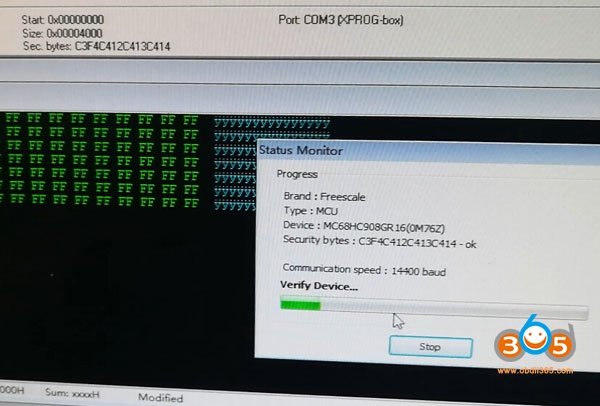
1)Read 908GR16 with Xprog
Require xprog version newer than 5.70 (Xprog v5.70, 5.745.84)
Connect ELV 908GR16 mcu with Xprog via HC(S)12 BDM adapter
xprog-read-audi-elv-908gr16-1

xprog-read-audi-elv-908gr16-2
In Xprog-m software, select Freescale MCU MC68H908GR16_FLASH+ security
xprog-read-audi-elv-908gr16-3
select Read Security Bytes
xprog-read-audi-elv-908gr16-4
Bypass security
xprog-read-audi-elv-908gr16-5

Xprog m read security byte success, press OK to continue
Go to Options tab->Environment->Device->Manual
xprog-read-audi-elv-908gr16-6

xprog-read-audi-elv-908gr16-7
Manully enter security bytes
xprog-read-audi-elv-908gr16-8
Read 908GR16 in process
xprog-read-audi-elv-908gr16-9
Verify device
xprog-read-audi-elv-908gr16-10
Read data success
xprog-read-audi-elv-908gr16-11
Save data.
Reading procedure takes 1 minute and 59 seconds


2) Read 908GR16 with Xhorse VVDI Prog
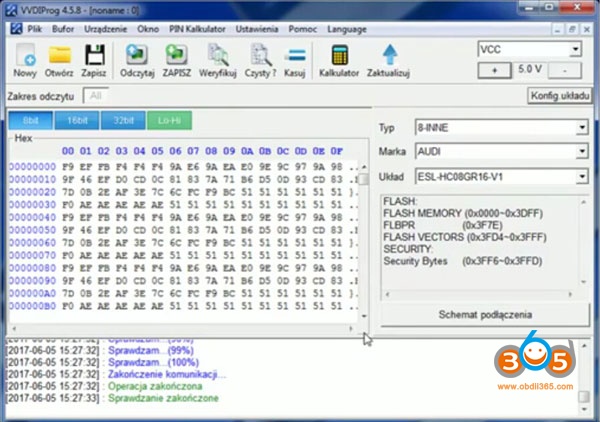
vvdiprog-read-audi-elv-908gr16-1

vvdiprog-read-audi-elv-908gr16-2
Follow wiring diagram to connect VVDI prog with ESL
vvdiprog-read-audi-elv-908gr16-3

In VVDIProg software, select Audi ESL HC08GR16 V1
vvdiprog-read-audi-elv-908gr16-4
vvdiprog-read-audi-elv-908gr16-5

Read data
vvdiprog-read-audi-elv-908gr16-6

Verify data
vvdiprog-read-audi-elv-908gr16-7

Save data
Reading process takes 2 minutes.


In conclusion:
Xprog is cheaper and faster than VVDIProg in Audi ELV 908GR16 reading.

http://blog.obdii365.com/2019/03/12/read-audi-elv-esl-hc908gr16-with-xprog-or-vvdi-prog/

Friday, March 8, 2019

How to Reset AEC302C AEC400 CDI controllers with Xprog

Manufacturer of AEC302C / AEC400 CDI controllers didn’t left possibility to access internal MCU memory by K-Line. Therefore it is really possible to reset them if you have any MOTOROLA MC68HC05E6 programmer (XPROG / XPROGm, UPA, CARPROG, ELNEC, etc.).

Opening the plastic casing
xprog-reset-AEC302C-cdi-1

xprog-reset-AEC302C-cdi-2
Make a cut around plastic casing to gain access to the printed circuit board (PCB). Don’t cut too deep – you can damage electrolytic capacitors near the edges of plastic casing! Clean the PCB from epoxy sealant. It is significantly easier to clean if sealant is heated using hot air station or other source of hot air (fan, etc.) – it becomes crumbly and comes out without excessive effort.


How to connect MCU programmer
xprog-reset-AEC302C-cdi-3

NOTE. Wire colors in the picture, corresponds to CARPROG cable A10. Signal symbols B2, B3, B5, B6, Vcc, Vpp – to XPROG / XPROG-m programmer.


MCU settings for programmer

MCU type: MC68HC05E6
Mask set: 0F82B
EEPROM start: 0x0100 (hex)
EEPROM size: 0xA0 (160 bytes)
Osc. Frequency: 4 MHz


How to reset CDI controller to NEW
xprog-reset-AEC302C-cdi-4
Change data at marked position from 00 to 01. This way you will change CDI controller state to NEVER PROGRAMMED. CDI controller is ready now to store new code on the first time ignition is switched to ON with a master key.

NOTE. Ignition must be switched on with valid MASTER key that belongs to immobilizer controller IMM003 / IMM006.